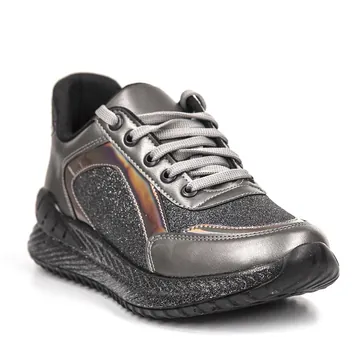
 Pace 2 Lightweight Running Shoes ₴2,749 R runora.ua Free delivery 4.6
 Shopping campaigns
Google Shopping Ads: Shopping Campaigns and Product Feeds
Product ads with a photo, price and store name in Search, on the Shopping tab, in Images and on YouTube. We start with your Merchant Center feed, because it determines which queries your products show for and how.
- Funnel stageSales
- Setupfrom ₴24,000
- Managementfrom ₴12,000/mo
Google Search on a computer: the person types “running shoes”, a “Sponsored products” row appears with photos, prices, stores and delivery, and the cursor expands one product card with details.
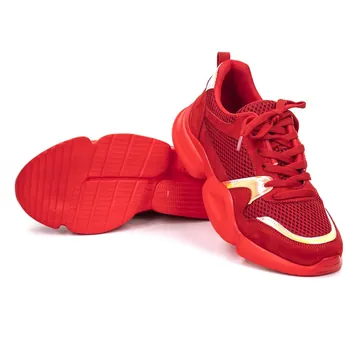
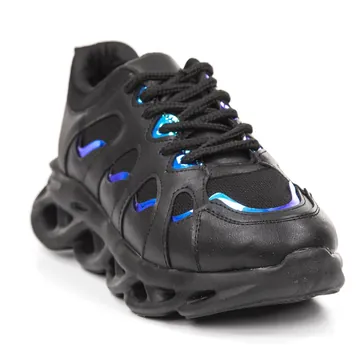


The Shopping tab in Google on a phone: a grid of products with photos, prices and “Price drop” tags; the person taps the “Free delivery” filter and the grid smoothly rearranges to keep only products with free delivery.




Google Lens on a phone: the camera points at a person’s sneakers on the street, the frame locks onto the shoe, and similar products slide up from below, including sponsored product ads with prices.


A local inventory product ad: sneakers marked “In stock · 1.2 km · Pick up today” with store hours and a map; the person taps Directions and sees the route to the store.
Video explainer
Google Shopping explained in 40 seconds
01 · Feed
products.xml Merchant Center
| title | price | gtin | availability |
| Aero Running Shoes, Women's | 3,290 UAH | 4820000123456 | in_stock |
| Pace 2 Sneakers, Lightweight | 2,749 UAH | 4820000654321 | in_stock |
| Trail Grip X, Water-Resistant | 4,150 UAH | 4820000777888 | preorder |
Shopping ads
Feed Products with titles, prices, images and availability flow into Google Merchant Center through the feed.
What it is
Google Shopping: the essentials
Shopping campaigns don't show text; they show a product card: photo, title, price, store name and often a rating, discount or shipping details. There are no keywords: Google matches queries based on the data in your product feed in Google Merchant Center. That's why, for Shopping, feed quality matters as much as keywords and ad copy do for Search.
Shoppers see the product and price before they click, so they arrive on your site already intending to buy. Today there are two ways to advertise products: a Standard Shopping campaign with full control over product groups and search terms, or Performance Max with a feed, which adds YouTube, Display, Discover and Gmail. We choose one or combine both depending on your catalog, margins and the volume of sales data.
Google Search A product carousel above the text ads or next to the search results for product queries, on mobile and desktop.
Shopping tab A dedicated section for comparing products and prices. Free product listings from Merchant Center also appear here alongside ads.
Google Images Product ads in image search results: a strong surface for apparel, home decor, jewelry and other visual categories.
YouTube Products in YouTube search results and, with Performance Max and a feed, also in video ads with a product carousel below the video.
Search partners Google partner sites with search. We turn them on or keep them only if the data confirms the quality of this traffic.
Gmail and Discover Mainly through Performance Max with a feed. Standard Shopping campaigns reach these surfaces only when the corresponding network setting is enabled.
Mechanics
How it works under the hood
- 01
Feed in Merchant Center
You send Google Merchant Center data on every product: title, description, price, availability, images, brand, GTIN and category. Google checks it against its policies and the data on your website.
- 02
Matching queries to products
There are no keywords: Google matches the query to the product's title, description, attributes and category. That's why the title in your feed effectively works as a keyword.
- 03
Auction and serving
Your bid, predicted click and conversion rates, and product relevance determine which cards make it into the carousel and in what position. You pay per click on the product.
- 04
Purchase and optimization
The Google Ads tag sends the purchase and order value. ROAS-based bidding learns from this data, while we manage product segments, negative keywords and the feed itself.
Who it’s for
When to use Google Shopping
Online stores with large catalogs
You can't manually cover hundreds or thousands of products with keywords. A feed scales advertising across the entire catalog, and segmentation directs budget to where the profit is.
Competitively priced products
When your price is below or in line with the market, a product card showing the price in search results becomes a strong argument before the click.
Branded products with GTINs
Electronics, auto parts, baby products, cosmetics: shoppers search for a specific model, and Google precisely matches the query to the product by GTIN and MPN.
Visual categories
Apparel, footwear, home decor, jewelry: a photo sells better than text, and Google Images and YouTube provide additional impressions.
Stores that need control
A Standard Shopping campaign shows search terms and supports negative keywords, campaign priorities and product group bids, which is essential for low-margin categories.
Formats
Ad formats and their anatomy
Google Search on a computer: the person types “running shoes”, a “Sponsored products” row appears with photos, prices, stores and delivery, and the cursor expands one product card with details.
Product ad
Photo, product title, price, store name. Depending on the data, Google adds the original price with a discount, the product rating, and shipping and return details.
Free listings
Products from Merchant Center can show for free on the Shopping tab and other Google surfaces. It's additional traffic driven by the same high-quality feed.
Promotions
Special offers from Merchant Center (a discount, gift, free shipping or promo code) appear in the ad as a separate annotation and make the product stand out from competitors.
Product ratings
Stars and review count under the product from the Product Ratings program in Merchant Center. This requires reviews collected through a supported platform or your own review feed.
Standard Shopping vs. Performance Max with a feed
A Standard Shopping campaign gives you control: search terms, negative keywords, priorities, product groups. PMax with a feed covers all Google channels and scales better, but it needs strong conversion data.
What we do
What we set up in the campaign: 12 steps
No templates: we adapt every item to your niche, margins and goals. Here’s what our launch checklist looks like.
- 01 Google Merchant Center We create or audit your Merchant Center account (formerly Merchant Center Next): site verification, shipping, returns, business information and the link to Google Ads.
- 02 Feed audit We check required and recommended attributes: title, description, price, sale_price, availability, image_link, brand, gtin, mpn, condition, google_product_category, product_type.
- 03 Product title optimization We restructure titles around search behavior: product type, brand, model and key attributes such as size, color, material and volume. The most important information goes first.
- 04 Supplemental feeds and rules We fix data without touching your CMS: supplemental feeds for titles, categories and labels, plus Merchant Center rules to transform attributes.
- 05 Custom labels custom_label_0–4 We tag products by margin, price range, status (bestseller, new arrival, seasonal, “zombie” with no impressions) and stock level to manage bids by segment.
- 06 Disapproval diagnostics We work through product diagnostics: price or availability mismatches with the site, missing GTINs, image issues, policy violations. Account-level issues are handled separately, including the risk of suspension for misrepresentation.
- 07 Images A clean photo on a neutral background, without watermarks, promotional text or borders, in sufficient resolution, plus additional angles in additional_image_link.
- 08 Segment-based structure We split products by profitability: bestsellers, high-margin products, new arrivals and “zombies.” Each segment gets its own ROAS target and budget.
- 09 Standard Shopping and PMax together We decide which products go into Performance Max with a feed and which into a Standard Shopping campaign for query control. We don't duplicate products across campaigns without clear logic.
- 10 Negative keywords and search terms In Standard Shopping campaigns, we regularly review search terms; in PMax, the search terms report and campaign-level negative keywords. Brand queries are tracked separately.
- 11 Conversions with value A purchase tag with order value and transaction ID, enhanced conversions, Consent Mode v2. Where possible, we pass cart data to see exactly which products sell.
- 12 Promotions, ratings, prices We set up promotions in Merchant Center, connect product ratings and analyze the price competitiveness report to see where pricing holds back sales.
Audit
The mistakes we find most often
If your ads are already running, let’s start with an audit. Here’s what usually eats up the budget in this campaign type.
Mistake 01
The feed exactly as the CMS exported it
Titles like “Model 2041 black,” empty descriptions, no brand or GTIN. Google doesn't understand which queries to show the product for, and impressions go to random searches.
Mistake 02
Everything in one “All products” group
One bid and one target for products with both minimal and high margins. A few popular items eat up the budget, while the rest of the catalog gets no impressions.
Mistake 03
Feed and website mismatch
Price or availability in the feed doesn't match the site because of infrequent updates. Products get disapproved, and repeated violations put the account at risk of restrictions.
Mistake 04
Ignoring Merchant Center diagnostics
Part of the catalog sits in “Disapproved” or “Limited” status for months, and nobody notices because the campaign is technically running.
Mistake 05
One ROAS target that ignores margin
There's a single target for the entire store, calculated from revenue rather than profit. The campaign scales high-ticket, low-margin products, and profit doesn't grow.
Mistake 06
No control over queries and brand
In Standard campaigns, nobody analyzes search terms, and PMax with a feed captures brand queries and reports them as new sales.
Metrics
What we track
- ROAS and gross profit Revenue per hryvnia of ad spend is only half the picture. Where possible, we evaluate profitability with margin factored in or pass it via cart data.
- Product-level performance Which products drive sales and which only spend budget. This is the foundation for segmentation with custom labels.
- Products without impressions “Zombies” are products Google barely shows. We move them into a separate campaign with a different target to test whether there's demand for them.
- Impression share and lost impression share For priority categories, it shows how much demand you're missing because of budget or rank.
- Product status in Merchant Center How many products are approved, limited or disapproved. We check diagnostics weekly and immediately after any feed changes.
- Price competitiveness The price competitiveness report in Merchant Center shows where your price is above market, and therefore where ads will convert worse regardless of the bid.
Bidding
Bid strategies
Maximize conversion value The core strategy for Performance Max with a feed and for Standard Shopping campaigns when purchases are tracked with order value.
Target ROAS (tROAS) A separate ROAS target for each segment: higher for low-margin products, lower for high-margin products worth scaling, and a dedicated target for new arrivals.
Manual CPC In Standard Shopping campaigns: for launching without conversion history, testing individual products or precisely controlling bids by product group.
Maximize clicks Only as a temporary tool for collecting data on a new catalog or “zombie” products, always with a maximum CPC bid limit.
Standard campaign priorities Priority (low, medium, high) determines which campaign enters the auction when a product is in several. Together with negative keywords, it's a tool for routing queries between campaigns.
Industries
Where this campaign type works especially well
Pricing
Full-service Google Shopping: what it costs
You pay the ad budget directly to Google. Our fee is fixed — no percentage of spend below the Scale plan.
Setupfrom ₴24,000
Managementfrom ₴12,000/mo
Auditfree
FAQ
Questions and answers: Google Shopping
Didn’t find your answer? Ask us directly — we’ll advise for free.
Which is better: a Standard Shopping campaign or Performance Max with a feed?
It depends on your catalog and data. PMax has broader reach and scales better given quality conversions, while a Standard campaign provides search term transparency and precise control. Since PMax lost its automatic priority over Standard Shopping campaigns, Ad Rank decides between them, so both types can run together with clear logic for how products are split.
Why aren't some of our products showing?
The most common reasons are Merchant Center disapprovals (price or availability mismatches, missing GTINs, image issues), weak titles or uncompetitive prices. Sometimes a product is approved, but the algorithm doesn't give it impressions due to a lack of data. We work through the diagnostics and move such products into a separate segment.
Do we need to change anything on our website for Google Shopping?
Often yes, but in targeted ways. Your site needs contact details, shipping and return policies, prices and availability that match the feed, and a secure checkout. We check this during the audit and fix it together with your developers or on our own.
What are free product listings?
They're impressions of your products on Google with no cost per click, on the Shopping tab and other Google surfaces. They run on the same feed as your ads, so feed optimization improves both channels. Paid ads, meanwhile, provide broader reach and more prominent positions.
How often should the feed be updated?
As often as prices and availability change. For most stores, that means at least once a day via a scheduled fetch or the Merchant API, and more often for dynamic pricing. A mismatch between the feed and the website is one of the main reasons products get disapproved.
Can we advertise products without a GTIN?
Yes, if it's your own product or no GTIN exists for it: in that case, we provide the brand and MPN or indicate that no identifier exists. But for branded products that do have a GTIN, leaving it out weakens query matching and can limit impressions.
Free audit
We’ll launch your campaign right from day one
Leave your contact — a specialist will review your ads or website and prepare a short breakdown with concrete next steps. No obligations, no hard selling.
- 01 A short call or chat We clarify your niche, goals and what you’ve already tried.
- 02 Ads and website review We check the account (read-only access), tracking and landing pages.
- 03 Action plan You get a list of issues and priorities — even if you don’t work with us.
We reply within 1 business day